
Subtitles are a fantastic accessibility feature, but not everyone's cup of tea. Need to tweak your subtitle settings in Avowed? Here's how to easily turn them on or off.
How to Turn Subtitles On & Off in Avowed
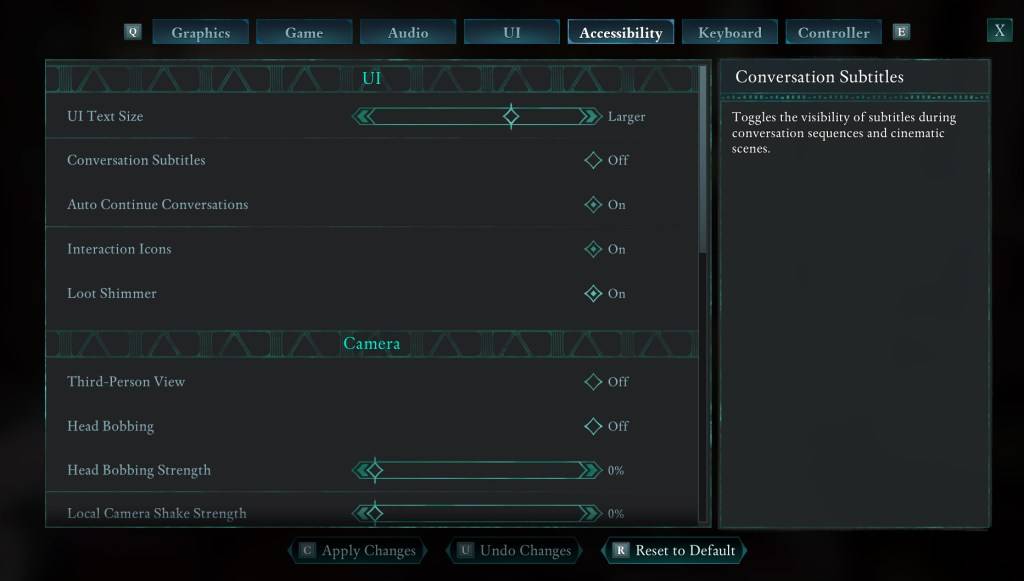
Avowed offers subtitle options early on, but you can easily adjust them later. There are two places to manage your subtitle settings: the "UI" and "Accessibility" tabs within the game's Settings menu. Look for "Conversation Subtitles" and "Chatter Subtitles" and adjust them to your liking. The "Accessibility" tab is generally the most straightforward location for these settings.
Why Some Players Disable Subtitles
While subtitles are essential for many players, some find them distracting. Ultimately, it's a matter of personal preference. Enable them if you need or prefer them; disable them if they hinder your enjoyment.
Avowed's Accessibility Features
Avowed boasts a solid range of accessibility options, though perhaps not as extensive as some other titles. Beyond basic subtitle toggling, you can customize subtitle size, background opacity, and display duration for enhanced readability.
The game also includes features to mitigate motion sickness, such as adjustable camera shake and head bobbing. Further options allow for aim assist adjustments, toggling crouch and sprint, and other helpful tweaks for broader player inclusivity.
That's all there is to turning subtitles on and off in Avowed. Enjoy the game!
Avowed is available now.






















![City Devil: Restart [v0.2]](https://img.icssh.com/uploads/38/1719554737667e52b102f12.jpg)


