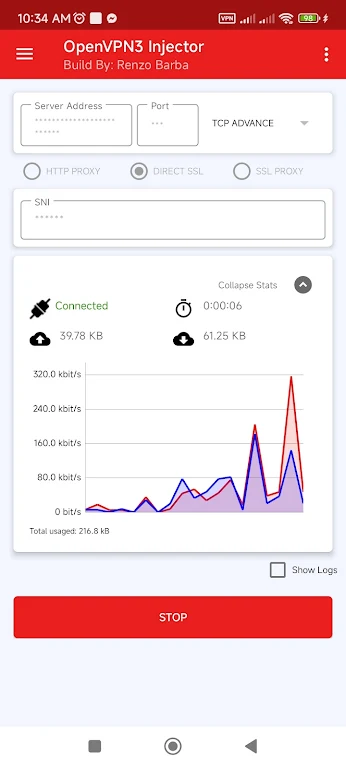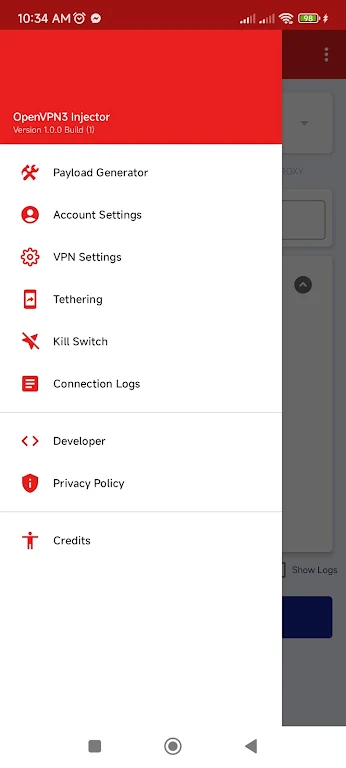

OpenVPN3 Injector is a powerful and feature-rich VPN application designed to improve your online activities. It enables you to run OpenVPN connections via an HTTP proxy, import and export configuration files, and even share your internet connection through tethering. The app includes ready-to-use server profiles from leading VPN services like tcpvpn.com, simplifying the setup process. Alongside an intuitive user interface, you get access to numerous global server locations, plus essential security tools such as DNS and IPv6 leak protection and a kill switch. Whether your priority is privacy, unblocking geo-restricted content, or sharing your connection, this app provides a reliable solution.
Key Features of OpenVPN3 Injector:
> Advanced Capabilities: Beyond basic VPN functions, OpenVPN3 Injector lets you route OpenVPN through an HTTP proxy, import and export config files, and share your internet with other devices using its built-in tethering feature.
> Pre-configured Profiles: Ready-made profiles from popular providers such as tcpvpn.com are included. Users can select these directly from the app menu, avoiding manual configuration. You can also import the standard tcpvpn.com certificate for enhanced security.
> User-Friendly Interface: The app’s clean and straightforward interface makes configuring and connecting to VPN servers simple. With just a few taps, you can choose from servers in many countries, helping you bypass regional blocks and access content unavailable in your location.
> Strong Security: Robust protection features include DNS leak prevention, IPv6 leak protection, and a kill switch that halts internet traffic if the VPN disconnects. This ensures your online actions and data remain private and secure.
Frequently Asked Questions:
> Can I use OpenVPN3 Injector to share my internet connection with multiple devices?
Yes, the app offers a tethering feature that lets you share your connection easily with other devices like phones or tablets. This is especially handy when you need to provide internet to several gadgets without configuring individual VPN connections for each.
> How do I select a VPN server from a specific country?
OpenVPN3 Injector provides a wide selection of servers across different countries. Just open the app, go to the server menu, and pick your desired country. Your internet traffic will then be routed through a server in that region, allowing you to bypass geo-blocks and reach locally restricted content.
> What protocols does the app support?
The app supports multiple protocols, including TCP and UDP. You can pick the one that suits your needs and network environment. TCP is typically more stable, while UDP often delivers higher speeds. Try both to see which performs better for your usage.
Final Thoughts:
OpenVPN3 Injector is a versatile VPN tool packed with advanced features to boost your online experience. Whether you need to run OpenVPN via an HTTP proxy, use pre-configured profiles, share your connection, or maintain strong security, this app delivers. Its easy-to-use interface lets you quickly set up and connect to servers around the world, helping you overcome geo-restrictions and access content that might otherwise be blocked in your area.