Touch Controls: Revolutionizing YouTube Video Control
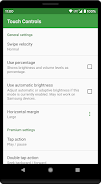
Tired of fiddling with your phone's volume and brightness buttons while watching YouTube videos? Touch Controls offers a sleek, VLC-style solution. This innovative app lets you effortlessly adjust brightness and volume using simple finger gestures directly on your screen. Swipe left for brightness, swipe right for volume – it's that intuitive.
The app's core functionality centers around gesture-based controls for seamless video management within the official YouTube and YouTube Go apps. But that's not all.
Key Features:
- Intuitive Gesture Control: Adjust brightness and volume with smooth, VLC-inspired swipes.
- Effortless Volume Adjustment: Precise volume control with a simple up or down swipe on the right side of the screen.
- Seamless Brightness Control: Easily fine-tune screen brightness with left-side swipes.
- Official YouTube App Support: Works flawlessly with both the standard YouTube and YouTube Go apps.
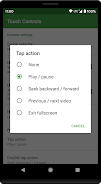
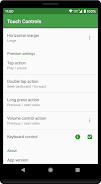
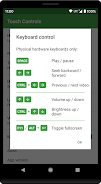
- Premium Upgrade: Unlock advanced features including tap, double-tap, long-press actions, refined volume controls, seek support, and keyboard control for even more precise command.
- Privacy Focused: Respects your privacy and doesn't collect any personal data related to your YouTube activity.
- Accessibility Services Integration: Leverages accessibility services to seamlessly integrate with fullscreen YouTube videos, enabling transparent overlays for gesture and keyboard control.
Touch Controls provides a user-friendly, privacy-conscious way to enhance your YouTube viewing experience. Download now and experience effortless control over your videos!