Home News Why Call of Duty: Black Ops 6 Looks Grainy & Blurry

Why Call of Duty: Black Ops 6 Looks Grainy & Blurry

Author : Noah Mar 05,2025

Enhance Your Call of Duty: Black Ops 6 Visuals: A Guide to Sharper Graphics

Many Call of Duty fans expect top-tier performance, but Black Ops 6 can sometimes fall short, resulting in grainy and blurry visuals. This guide will help you optimize your settings for a crisper, more immersive gaming experience.

Why the Grain and Blur?

If your Black Ops 6 visuals are subpar despite optimal hardware settings, in-game settings are likely the culprit. Updates can sometimes reset options to defaults, affecting image quality. The key settings are within the Graphics settings, specifically the Display, Quality, and View tabs.

Eliminating Blur Effects

Motion Blur and Depth of Field, while enhancing cinematic appeal in some games, can hinder gameplay clarity in fast-paced titles like Black Ops 6. To disable them:
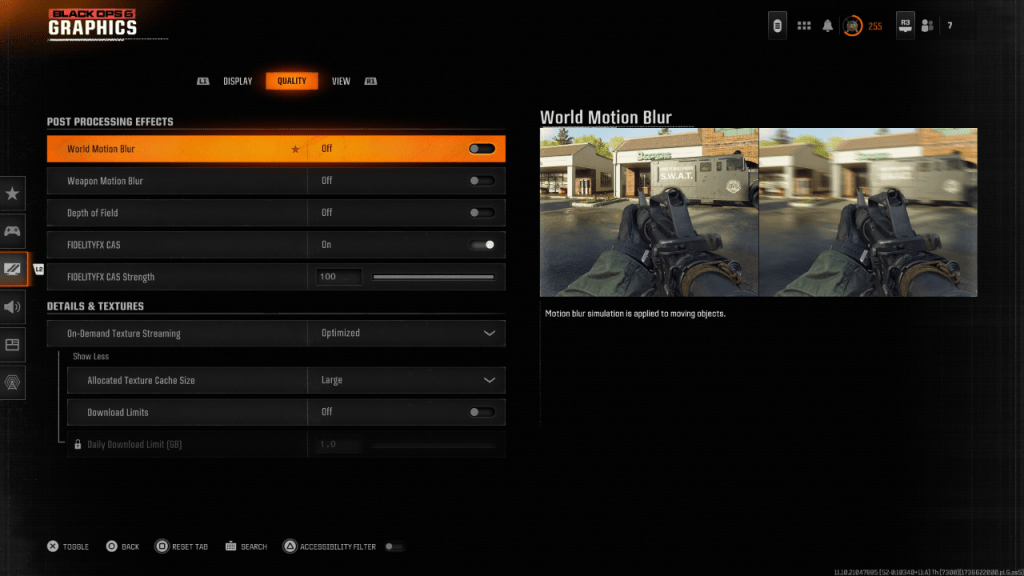
Image: Black Ops 6 Graphics Settings

  1. Navigate to the Graphics settings, then the Quality tab.
  2. Locate "Post Processing Effects."
  3. Set "World Motion Blur," "Weapon Motion Blur," and "Depth of Field" to "Off."

Improving Clarity and Sharpness

Incorrect gamma and brightness settings can also impact image quality.

  1. Access the Display tab in the Graphics settings.
  2. Adjust the Gamma/Brightness slider until the Call of Duty logo is barely visible (a value of 50 often works well, but adjust as needed).
  3. In the Quality tab, enable FIDELITYFX CAS. Setting the strength to 100 can maximize sharpness.

Optimizing Textures and Details

Black Ops 6's On-Demand Texture Streaming, while saving storage space, can compromise image quality. For optimal visuals:
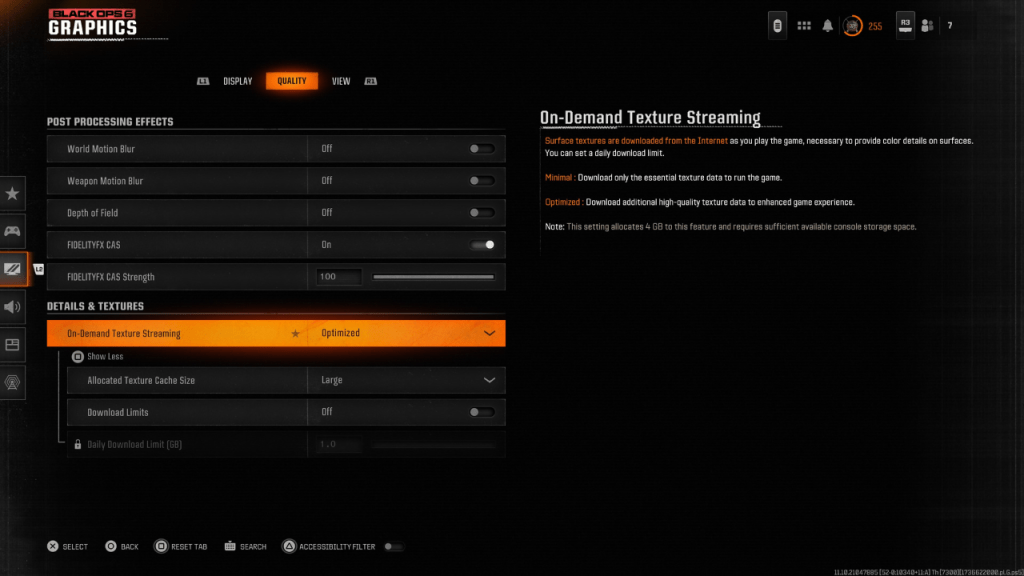
Image: Black Ops 6 Texture Settings

  1. Go to the Details & Textures settings under the Quality tab.
  2. Set "On-Demand Texture Streaming" to "Optimized."
  3. Click "Show More" to access additional options.
  4. Set "Allocated Texture Cache Size" to "Large."
  5. Consider setting "Download Limits" to "Off" (if your internet plan allows).

By following these steps, you can significantly improve the visual fidelity of Call of Duty: Black Ops 6, enhancing your overall gaming experience.
Latest Articles More
  • Dungeon Delights Manga Box Set Hits Amazon Low

    It's no secret that Delicious in Dungeon has rapidly become one of the most popular manga series available. With the anime's release fueling its rise and a second season in production, its fanbase continues to grow. While manga collecting can be an e

    Dec 17,2025
  • Grab an iPhone 17 Screen Protector for $5 on Amazon

    Apple has officially unveiled the iPhone 17, showcasing major upgrades including a redesigned Pro model with a vapor chamber for superior cooling during intense gaming, and the eagerly anticipated iPhone Air, a model rumored for years.While these new

    Dec 17,2025
  • MindsEye Dev Racing to Improve Performance Post-Steam Reviews

    The MindsEye development team acknowledged performance issues raised by Steam reviewers and confirmed ongoing optimization efforts.Build A Rocket Boy's inaugural release debuted June 10th with 'Mixed' Steam reviews and peaked at 3,302 concurrent play

    Dec 17,2025
  • Silver & Blood: Redeem Codes July 2025

    In Silver and Blood: Requiem, redemption codes serve as valuable tools for players to obtain premium items without purchases. Developers regularly distribute these codes during special occasions, game achievements, partnerships, and marketing initiat

    Dec 16,2025
  • Bose Smart Ultra at 50% Off With Dolby Atmos

    Bose has activated a 10% discount coupon code "REFURB10" for select refurbished items at its official eBay store. A standout deal is on the flagship Bose Smart Ultra Soundbar, its largest and most advanced model featuring Dolby Atmos and Bose TrueSpa

    Dec 16,2025
  • Infinity Nikki 1.5 Compensation Plan Announced

    Infinity Nikki Version 1.5 Update FalloutPlayers Receiving Diamond CompensationThe launch of Infinity Nikki's Version 1.5 proved disappointing as developer Infold Games failed to deliver on promised features while introducing multiple technical issue

    Dec 16,2025