Home News Best Settings to Reduce Motion Sickness in Avowed

Best Settings to Reduce Motion Sickness in Avowed

Author : Riley Mar 19,2025

Motion sickness can really put a damper on enjoying first-person games, and *Avowed* is no exception. If you're experiencing nausea while playing, don't worry—we've got you covered. Here's how to tweak the settings to minimize that queasy feeling.

Recommended Videos Jump To:

--------

The Best Settings to Reduce Motion Sickness in Avowed
How to Remove Head Movement and Camera Shake
How to Fix the Field of View and Motion Blur
What If You’re Still Feeling Motion Sick?

The Best Settings to Reduce Motion Sickness in Avowed

-----------------------------------------------------

The main culprits behind motion sickness in first-person games are usually head movement, field of view, and motion blur. Let's tackle these in *Avowed*:

How to Remove Head Movement and Camera Shake
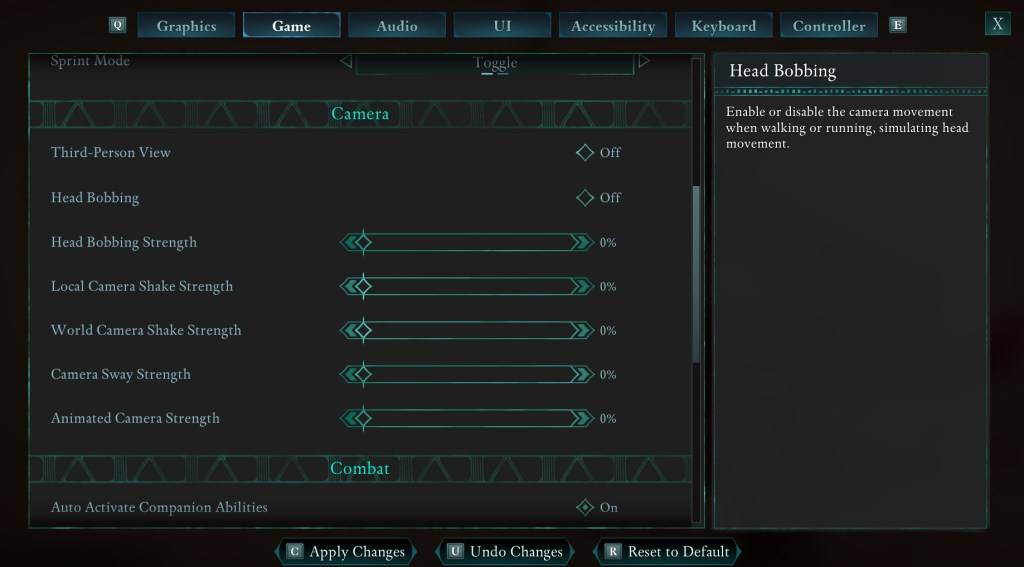
An image showing the settings menu in Avowed as part of a guide on how to reduce motion sickness while playing the game.

Disabling head movement and camera shake often eliminates motion sickness. Navigate to Settings, then the "Game" tab. In the "Camera" section, adjust these settings:

  • Third-Person View: Off or On (your preference).
  • Head Bobbing: Off
  • Head Bobbing Strength: 0%
  • Local Camera Shake Strength: 0%
  • World Camera Shake Strength: 0%
  • Camera Sway Strength: 0%
  • Animated Camera Strength: 0%

This should significantly reduce motion sickness. Experiment with these settings to find the optimal balance between immersion and comfort.

How to Fix the Field of View and Motion Blur
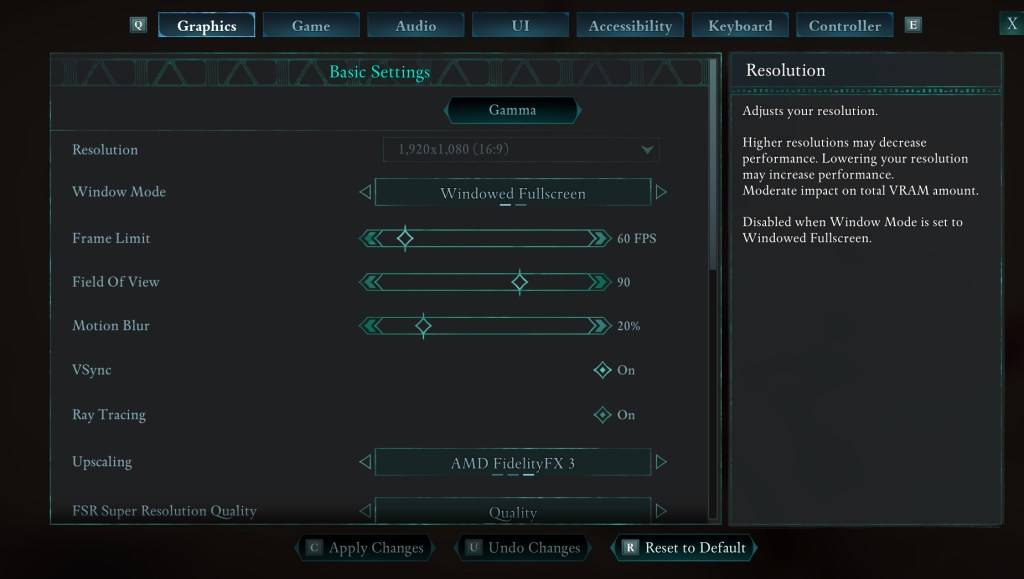
An image showing the settings menu in Avowed as part of a guide on how to reduce motion sickness while playing the game.

If eliminating head bobbing and camera shake isn't enough, head to the "Graphics" tab in Settings. Adjust the following:

  • Field of View: Start with a lower Field of View and gradually increase it until you find a comfortable setting. This might require some experimentation.
  • Motion Blur: Reducing or completely disabling motion blur often helps alleviate motion sickness. Try setting it to zero and adjust as needed.

What If You’re Still Feeling Motion Sick?

If motion sickness persists, continue experimenting with the settings above and consider switching between first-person and third-person view. If all else fails, take a break, drink some water, and try again later. Don't push yourself if you're feeling unwell.

These settings should help you enjoy *Avowed* without the discomfort of motion sickness. Happy gaming!

Avowed is available now.

Latest Articles More
  • Nintendo Cites GameStop Office Space Meme Amid Switch 2 Repair Process

    Nintendo and GameStop have responded to the Switch 2 launch day problem where consoles with cracked screens were sold to customers after receipts were stapled to the boxes.Impacted customers have informed IGN that GameStop has started providing repla

    Feb 23,2026
  • Master Julia: Skills, Builds & Team Tactics in Realms of Pixel

    In Realms of Pixel, Julia stands out as a Mythical-grade hero who masterfully combines offensive versatility with tactical flexibility. Valued for her reliable area-of-effect damage, scalable utility, and seamless synergy with various allies, she has

    Feb 23,2026
  • inZOI Karma System Sparks Ghost Town Concerns

    Cities in inZOI may transform into ghost towns when numerous Zois perish with negative karma. Discover how inZOI's innovative karma mechanics work ahead of its early access launch.inZOI Cities Can Become Overrun By SpiritsPopulation Growth Stalls Whe

    Feb 21,2026
  • "July 2025 Manga Disaster Prediction Spurs Travel Cancellations"

    In recent weeks, a previously obscure manga has captured headlines in Japan and internationally. "The Future I Saw" (Watashi ga Mita Mirai), by author Ryo Tatsuki, suggests Japan will experience a massive natural disaster in July 2025. This forecast

    Feb 20,2026
  • Valhalla Survival challenges your boss-slaying skills with new raid content and Nightmare Mode

    Chapter 6 of Nightmare Mode is now availableNew boss, Idun, Night Eternal joins the frayBalance adjustments includedIf you’ve finished exploring Niflheim last month, Lionheart Studio is kicking off the Halloween season with Chapter 6 of Nightmare Mod

    Feb 19,2026
  • Destiny 2: Awoken Wolf Guide - Skills and Acquisition

    Destiny: Rising brings the acclaimed PC and console FPS MMO series to mobile at last. The game features a roster of diverse characters you can acquire through gacha mechanics, yet one of the strongest might be right under your nose: your protagonist.

    Feb 18,2026